ABAP Data Dictionary
ABAP Data Dictionary
1. System Overview & Architecture
The ABAP Data Dictionary (DDIC), managed via Transaction Code SE11, is an integrated database management framework embedded within the SAP ABAP application server. It acts as a database abstraction layer positioned between SAP application programs and the underlying Relational Database Management System (RDBMS) such as Oracle or Microsoft SQL Server.
+-------------------------------------------------------+
|                 SAP Application Layer                 |
|             (ABAP Programs, SE38, SE80)               |
+-------------------------------------------------------+
                           |
                           v
+-------------------------------------------------------+
|             ABAP Data Dictionary (SE11)               |
|  (Domains, Data Elements, Structures, Tables, Views)  |
+-------------------------------------------------------+
                           |
                           v  (Auto-generated DDL / Objects)
+-------------------------------------------------------+
|               Underlying RDBMS Layer                  |
|          (Oracle, MS SQL Server, SAP HANA)            |
+-------------------------------------------------------+
Key Functional Capabilities
- Database Independence: Eliminates the requirement for developers to write platform-specific SQL Data Definition Language (DDL) scripts.
- Centralized Object Reuse: Enables system-wide definition and reuse of global data types, database tables, views, and search helps.
- Active Runtime Catalog: Database table structures defined in the DDIC are compiled directly into physical database objects upon activation.
2. Elementary Data Type Architecture: Domain vs. Data Element
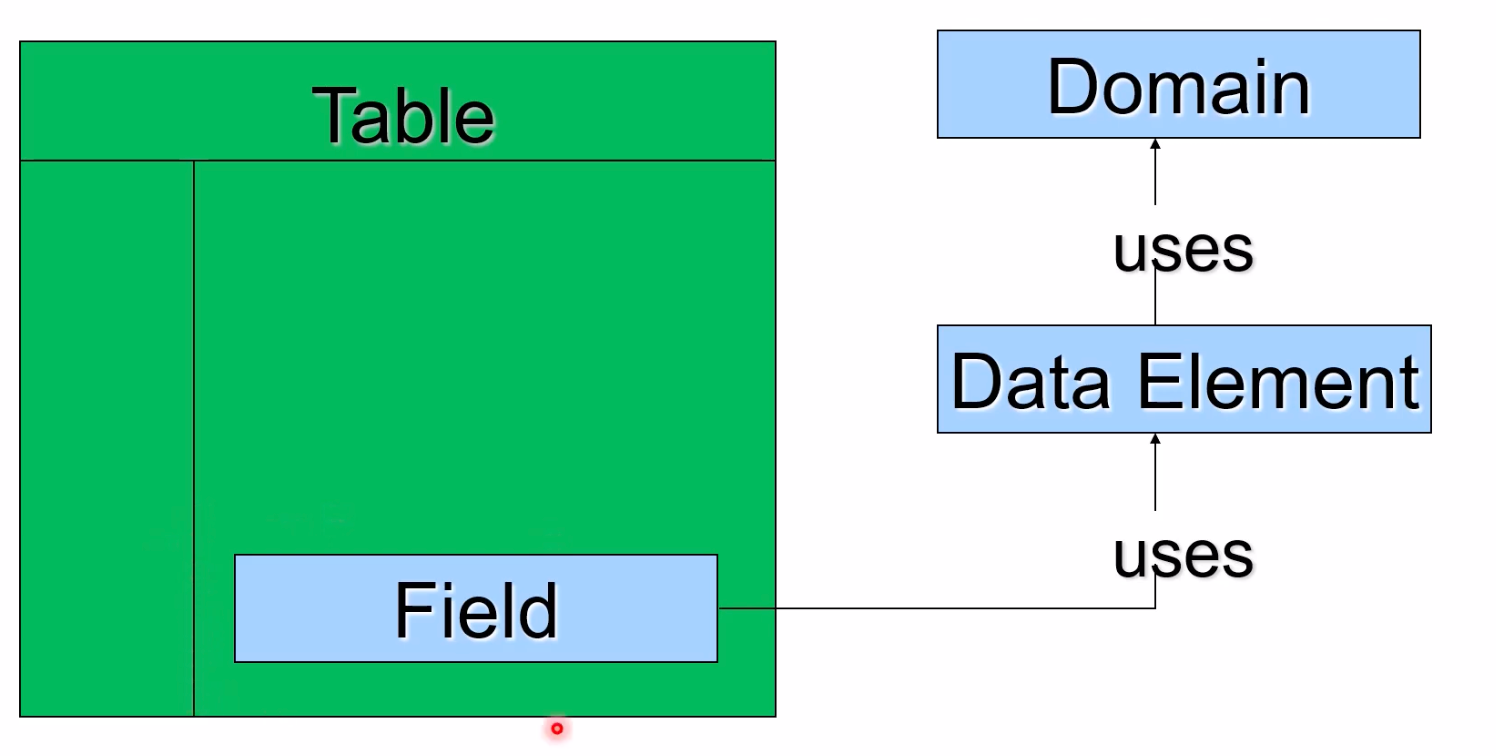
Data field definitions in the ABAP Dictionary decouple technical parameters from business semantics through a two-tier architecture comprising Domains and Data Elements.
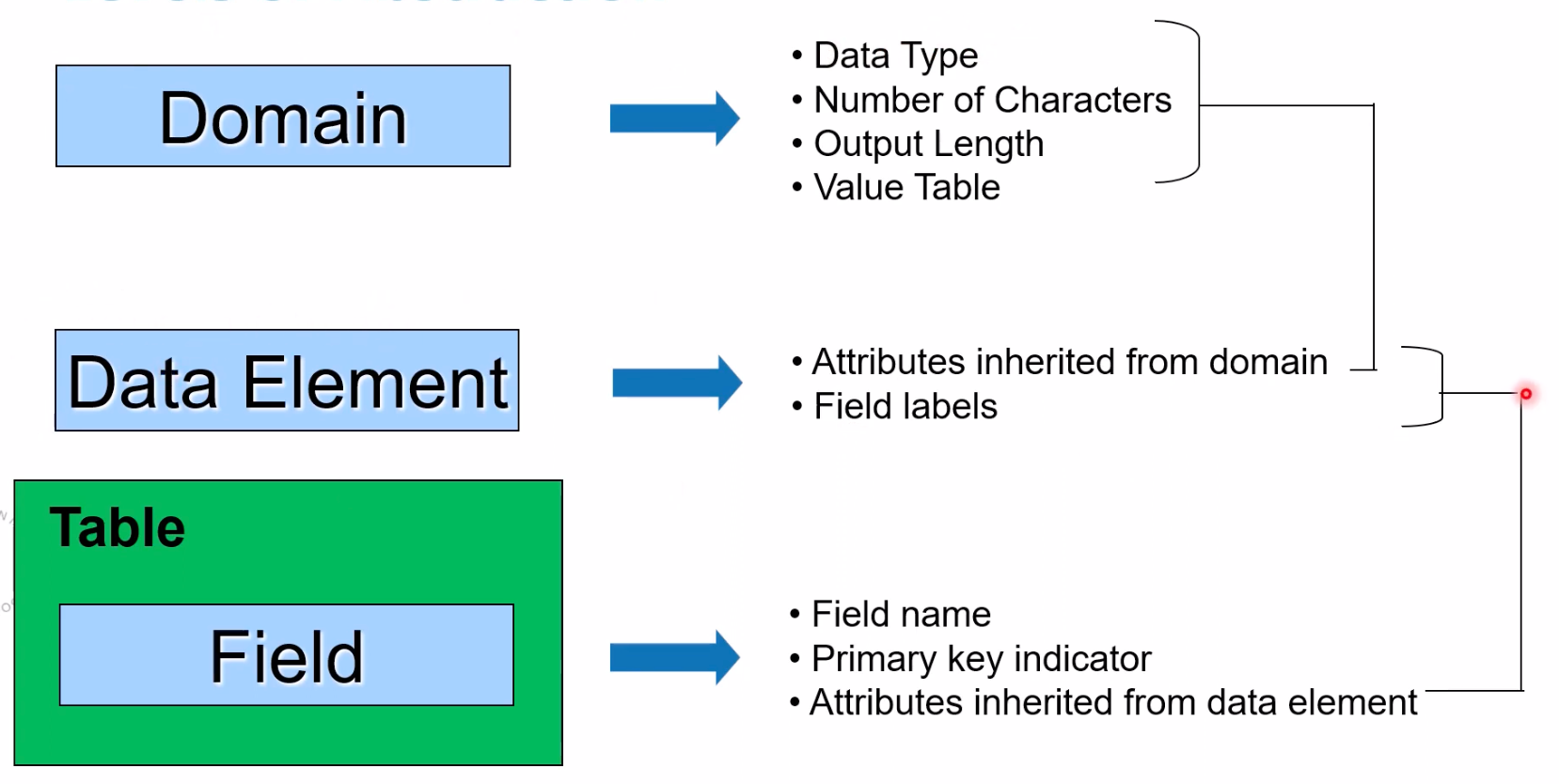
2.1 Domain (Technical Attribute Layer)
- Definition: Defines the physical and technical attributes of a data field.
- Technical Parameters:
- Built-in Data Type (e.g.,
CHAR,NUMC,DEC,DATS,TIMS). - Field Length and Output Length (accounts for formatting characters such as decimal points, currency signs, or negative indicators).
- Case Sensitivity toggle (
Lower Case/Case Sensitive).
- Built-in Data Type (e.g.,
- Value Restrictions:
- Fixed Values (Value Range): Hardcoded valid single values or interval ranges enforced at domain level.
- Value Table: Points to a master check table containing allowable key entries.
2.2 Data Element (Semantic Attribute Layer)
- Definition: Defines the business meaning and contextual usage of a data object.
- Semantic Attributes:
- UI Field Labels: Defines Short, Medium, Long, and Heading labels displayed across screens and report columns.
- F1 Help Documentation: Links to detailed documentation created via the documentation editor for end-user assistance.
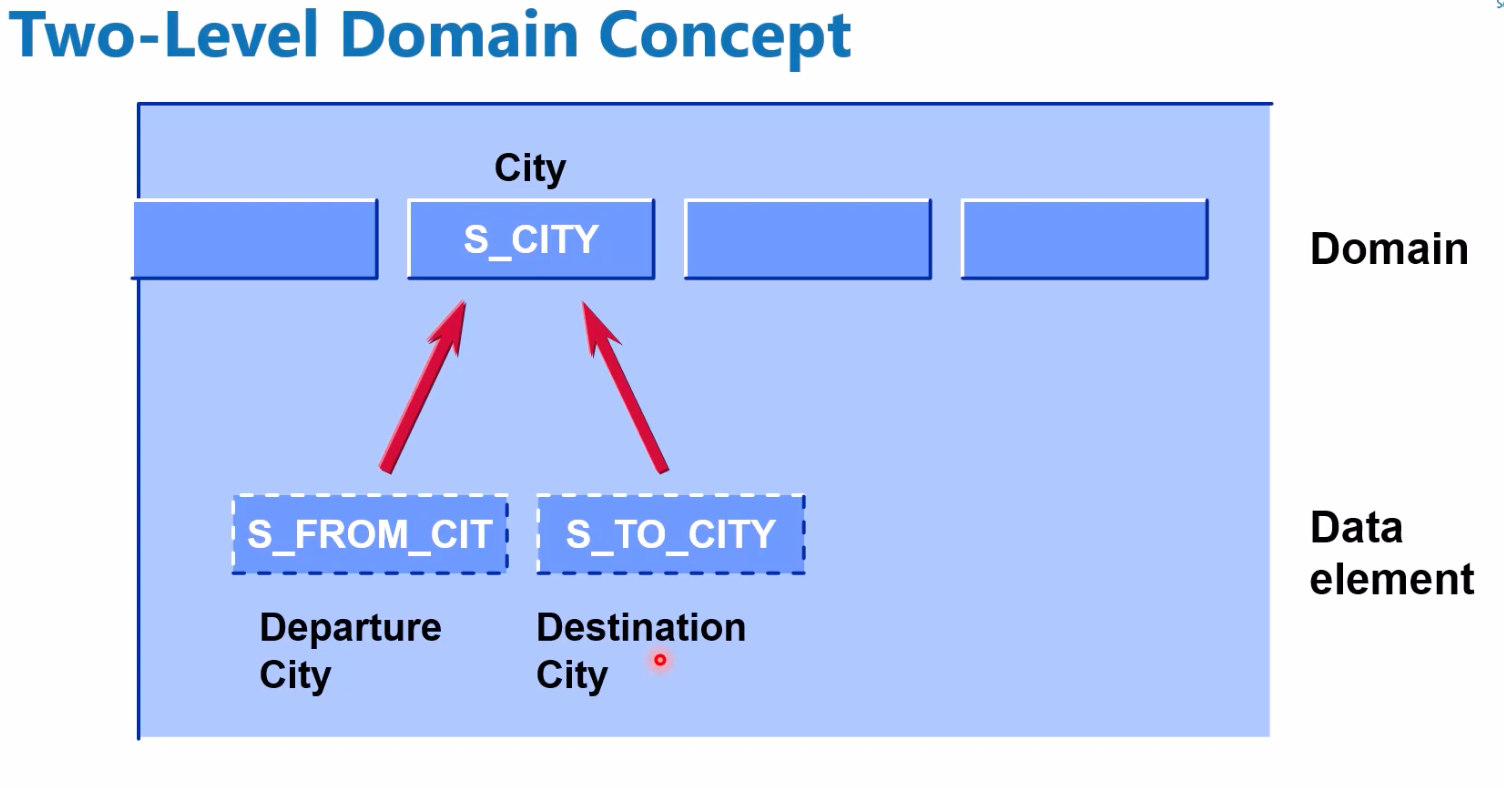
- Relationship: References a Domain to inherit technical attributes. A single Domain can be referenced by multiple Data Elements (e.g., Domain
S_CITYreferenced by Data ElementsS_FROMCITandS_TOCITY). - Naming Conventions: Domains and Data Elements reside in distinct object namespaces and can share identical names, though project guidelines typically utilize prefixes (e.g.,
DO_for domains,DE_for data elements).
Example:
3. Composite Data Objects & Database Tables
3.1 Structures
- Definition: Reusable, structured type definitions comprising a sequence of named components/fields.
- Behavior: Structures do not persist data in the physical database.
- Applications:
- Used in ABAP programs to instantiate Work Areas (single-row structures).
- Included directly within database table definitions via the
INCLUDEstatement to standardize field groups across multiple tables.
3.2 Data Categories in SAP
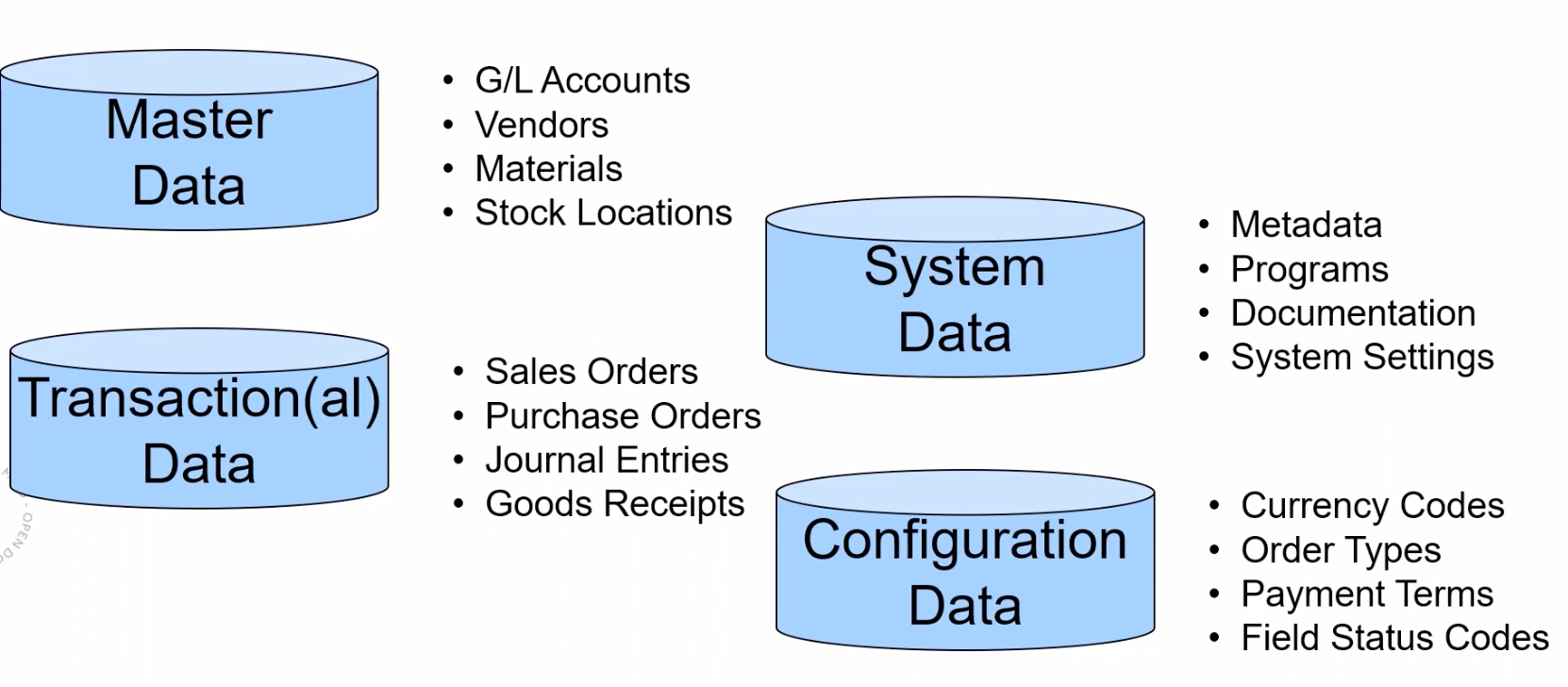
- Master Data: Core entity records modified infrequently (e.g., Customer, Vendor, Material, Employee).
- Transactional Data: High-volume operational transaction records (e.g., Sales Orders, Purchase Orders, Accounting Documents).
- Configuration Data: System customization parameters established during project setup (e.g., Currency Codes, Payment Terms).
- System Data: System administration and administrative runtime logs.
3.3 Database Table Types
| Table Type | Description & Physical Mapping |
|---|---|
| Transparent Table | 1-to-1 Mapping: Each transparent table defined in SE11 corresponds to exactly one physical table in the database. |
| Pooled Table | N-to-1 Mapping: Multiple logical pooled tables consolidated into a single physical table in the database; used primarily by system tables. |
| Cluster Table | N-to-1 Mapping: Multiple logical cluster tables combined into a single database cluster table (e.g., BSEG); optimized for complex structural documents, considered legacy in SAP HANA. |
| Table Type | Global Memory Type: A DDIC object defining internal table types used for ABAP program execution, containing no database persistence. |
3.4 Relational Features
- Primary Key: Uniquely identifies each record in a database table. Key fields cannot be edited directly after record insertion.
- Client Dependency (
MANDT/CLIENT): Automatic client separation is achieved by defining the primary key fieldMANDT(Data ElementMANDT), ensuring data isolation per system client. - Foreign Keys & Check Tables: Foreign key field definitions map fields to a Check Table to maintain relational data integrity and auto-generate F4 input validation.
4. Database Views & Core Data Services (CDS)
Views are logical definitions that join fields across one or more tables without duplicating physical data.
4.1 Classic DDIC Views (SE11)
- Database View: Implements standard inner joins across database tables for read access.
- Maintenance View: Configures table joins specifically to power Table Maintenance Generators (TMG) for administrative data entry.
- Projection View: Selects a subset of fields from a single table to mask unwanted attributes.
- Help View: Serves as the data selection foundation for Search Helps.
4.2 Core Data Services (CDS) Views
- Architecture: Modern, code-based data modeling tool defined inside Eclipse ADT using SQL DDL syntax.
- Integration: Automatically generates a underlying classic SQL View (limited to 16 characters) accessible via standard
SE11andSE16Nqueries.
5. Input Assistance & Data Inspection
5.1 Search Help (F4 Help)
Provides user assistance dialogs during UI field input.
- Elementary Search Help: Defines a single search path, specifying the selection method (table/view), input/output parameters, and hit list layout.
- Collective Search Help: Combines multiple Elementary Search Helps into a single tabbed dialog interface.
5.2 Data Inspection Utilities
SE16: Classic ABAP Workbench data browser utility; supports ALV Grid display via user parameter adjustments.SE16N: Enhanced application data browser providing field filtering and record inspection capabilities.
6. Technical Settings & Performance Guidelines
Every database table created in SE11 requires technical settings configuration prior to activation:
- Delivery Class: Specifies table data maintenance rules and client transport behavior (e.g.,
Afor Application Master/Transaction data,Cfor Customizing). - Data Class: Determines physical database space allocation:
APPL0: Master Data.APPL1: Transactional Data.USER: User-specific datasets.
- Size Category: Configures initial database extent allocation based on expected row count ranges.
- Buffering & Logging: Enables application server memory caching for static tables or logs change operations.
- Secondary Indexes: Additional index structures created on non-key columns to accelerate read performance; must be balanced against maintenance overhead during insert/update operations.